Trigger Settings#
Trigger Mode#
Trigger Hold (Level)#
Press the trigger button to start decoding, and release it to stop decoding. This decode cycle also ends after a successful decode or when the single-scan time times out.
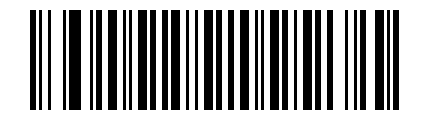
* Trigger Hold (Level)#
One-Shot Trigger (Pulse)#
Decoding starts after a trigger-level change is detected and maintained for about 30 ms (the exact time depends on the product). Decoding ends when another trigger-level change is detected. This decode cycle also ends after a successful decode or when the single-scan time times out.
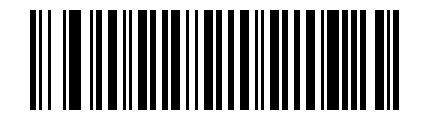
One-Shot Trigger (Pulse)#
Continuous Mode#
The scan engine operates continuously. After each successful decode or single-scan timeout, the current decode cycle ends and the next decode cycle starts automatically when the continuous decode interval is reached.
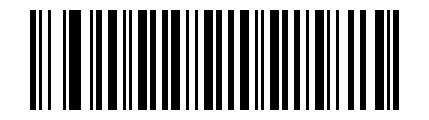
Continuous Mode#
Presentation Mode#
The scan engine monitors ambient brightness and starts decoding when the brightness changes. After a successful decode or a single-scan timeout, the current decode cycle ends and ambient-brightness monitoring resumes.
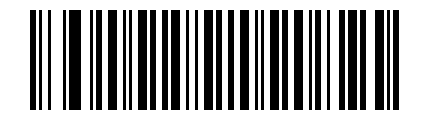
Presentation Mode#
Single-Scan Time (Scan Duration)#
Set the maximum duration of a single scan. After scanning this Parameter Barcode, scan three Numeric Barcodes to enter the time coefficient. If the value has fewer than three digits, pad it with leading 0.
- default
3000 ms- Unit
100 ms- Range
500-25500 ms
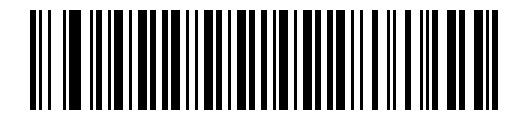
Single-Scan Time#
Example
To set 500 ms, scan this Parameter Barcode, then scan Numeric Barcodes 0, 0, and 5 in sequence.
To set 10500 ms, scan this Parameter Barcode, then scan Numeric Barcodes 1, 0, and 5 in sequence.
To change a selection or cancel an incorrect setting, scan Cancel Barcode.
Single Scan Time (Scan Duration) Quick Setup#
To select a commonly used duration directly, scan one of the quick Parameter Barcodes below.
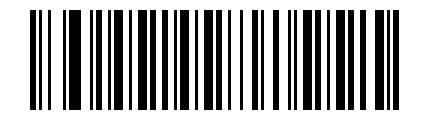
Unlimited#
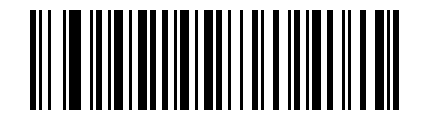
3 s#
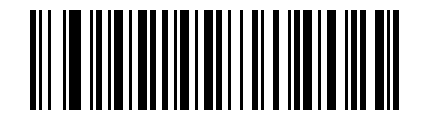
5 s#
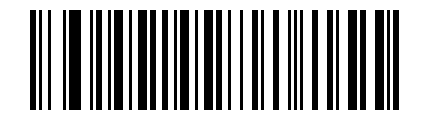
10 s#
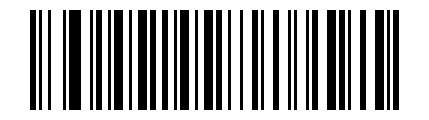
15 s#
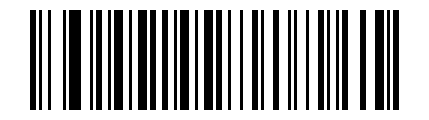
20 s#
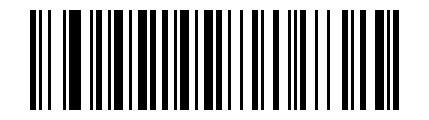
30 s#
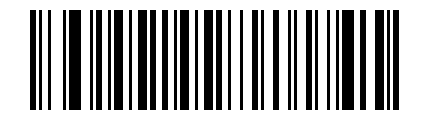
60 s#
Continuous Decode Interval#
In Continuous Mode, this parameter defines the wait time between two scan attempts. After the configured interval elapses, the next scan starts automatically whether the previous attempt succeeded or failed.
After scanning this Parameter Barcode, scan two Numeric Barcodes to enter the time coefficient. If the value has fewer than two digits, pad it with a leading 0.
- default
500 ms- Unit
100 ms- Range
0-9900 ms
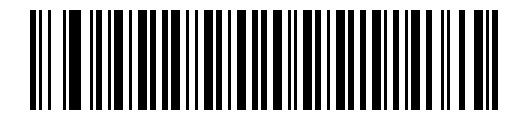
Continuous Decode Interval#
Example
To set 500 ms, scan this Parameter Barcode, then scan Numeric Barcodes 0 and 5 in sequence.
To change a selection or cancel an incorrect setting, scan Cancel Barcode.
Same Symbol Timeout#
To prevent the same barcode from being decoded repeatedly in Continuous Mode or Presentation Mode, configure the Scan Engine to accept the same barcode again only after the Same Symbol Timeout has elapsed.
After scanning this Parameter Barcode, scan two Numeric Barcodes to enter the time coefficient. If the value has fewer than two digits, pad it with a leading 0.
- default
500 ms- Unit
100 ms- Range
0-9900 ms
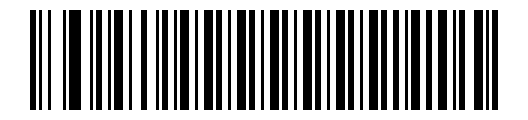
Same Symbol Timeout#
Example
To set 200 ms, scan this Parameter Barcode, then scan Numeric Barcodes 0 and 2 in sequence.
To set 1500 ms, scan this Parameter Barcode, then scan Numeric Barcodes 1 and 5 in sequence.
To change a selection or cancel an incorrect setting, scan Cancel Barcode.
Same Symbol Timeout Quick Settings#
To select a commonly used same symbol timeout directly, scan one of the quick Parameter Barcodes below. Six preset levels are available: 0 s, 1 s, 3 s, 5 s, 7 s, and unlimited delay.
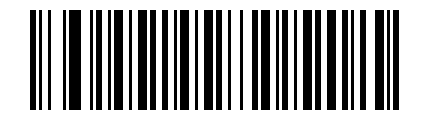
No Delay#
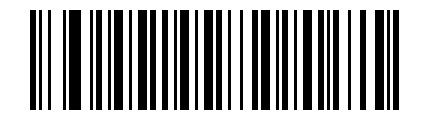
1 s Delay#
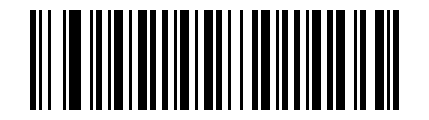
3 s Delay#
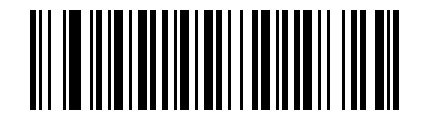
5 s Delay#
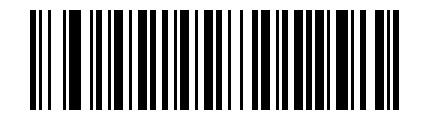
7 s Delay#
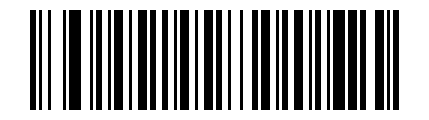
Unlimited Delay (Disable Same-Code Reads)#